Directory commands for an Interlisp file viewer
My ILsee program for viewing Interlisp source files is written in Common Lisp with a McCLIM GUI. It is the first of the ILtools collection of tools for viewing and accessing Interlisp data.
Although ILsee is good at its core functionality of displaying Interlisp code, entering full, absolute pathnames as command arguments involved a lot of typing.
The new directory navigation commands Cd and Pwd work like the analogous Unix shell commands and address the inconvenience. Once you set the current directory with Cd the See File command can take file names relative to the directory. This is handy when you want to view several files in the same directory.
Here I executed the new commands in the interactor pane. They print status messages in which directories are presentations, not just static text.
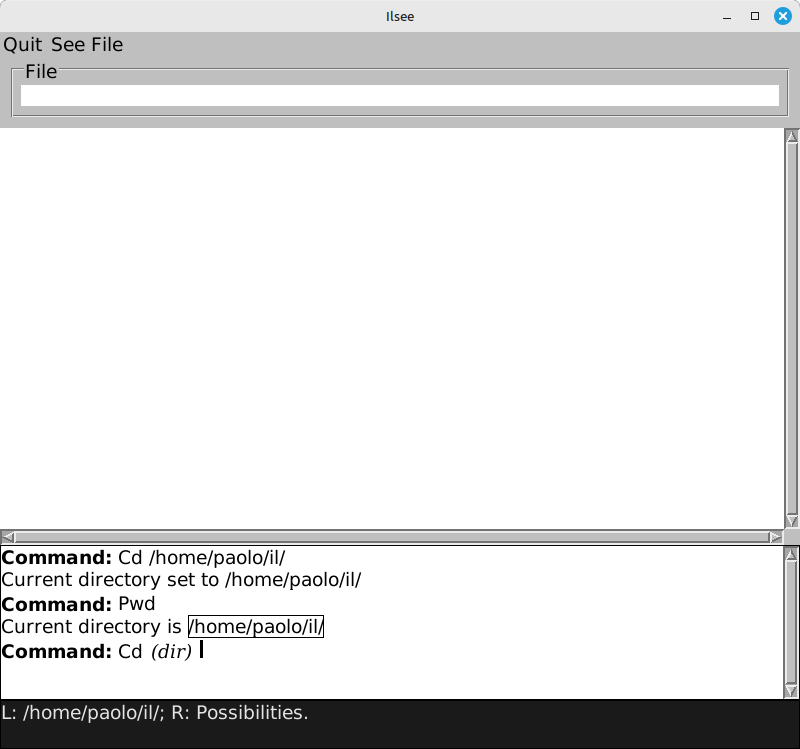
Thanks to the functionality of CLIM presentation types, previously output directories are accepted as input in contexts in which a command expects an argument of matching type. Clicking on a directory fulfills the required argument. In the screenshot the last Cd is prompting for a directory and the outlined, mouse sensitive path /home/paolo/il/ is ready for clicking.
Cd and Pwd accept and print presentations of type dirname, which inherits from the predefined type pathname and restricts input to valid directories. Via the functionality of the pathname type the program gets path completion for free from CLIM when typing directory names at the interactor.
The Cd command has a couple more tricks up its sleeve. A blank argument switches to the user's home directory, a double dot .. to the parent directory.
#ILtools #CommonLisp #Interlisp #Lisp
Discuss... Email | Reply @amoroso@oldbytes.space